

Connect
Overview
Spinwheel Connect enables you to authenticate and verify any consumer leveraging various verification methods.
Every connection gives you access to a consumer's sensitive personal data, so verifying that the user really is who they say they are matters. Spinwheel takes that seriously, and offers multiple ways to securely verify a user based on your business.
- Connect SMS or Connect Pre-Verified (SMS): The user's device is verified with a one-time passcode. Then, Spinwheel runs a check with the user’s mobile carrier to ensure device legitimacy and users billions of tokens to match the device to their identity.
Verifying at the device level is often more reliable than a credit report alone. Fraudsters have gotten sophisticated at building synthetic identities that pass traditional bureau checks. Spinwheel Connect SMS confirms how long a phone number has been tied to its carrier and device — giving Spinwheel a harder signal to fake and a stronger basis for returning a real identity.
- KBA (Knowledge-based Authentication): Not every user can be verified through a mobile device. Many partners layer in KBA questions as a fallback so no user is left without a path to connect.
- Connect Pre-Verified User Profile or Bring Your Own Authentication: Already have an identity verification solution that meets credit bureau standards? Skip Connect SMS and connect users directly through the Pre-Verified User Profile solution instead.
Most organizations default to one of the Connect SMS solutions. The exception is large enterprises that already perform KYC at the level required to access consumer data. In this case, the User Profile endpoint may be the better fit.
Talk to your Spinwheel Customer Success Manager to determine what the right approach is for your use case.
| Endpoint | Who It Is For | Spinwheel's Responsibility | Client's Responsibility |
|---|---|---|---|
| Connect SMS | Most organizations where a consumer can receive a text on their own mobile device. | • Send and verify one-time passcode • Run checks with the mobile carrier to confirm device legitimacy • Match device to the consumer's identity • Prefill consumer PII (SSN, known addresses) once matched | • Collect consumer's phone number and DOB • Display required consent language • Manage fallback paths if verification fails |
| Connect Pre-Verified (SMS) | Organizations that have already verified the consumer's phone number via their own SMS/OTP flow. | • Accept organization’s proof of verification (verification date, verification type, consent date) • Connect user without re-running Spinwheel's OTP | • Perform and own phone verification • Supply phone number, DOB, verification date, verification type, and consent date |
| KBA (Knowledge-Based Authentication) | Consumers who can't be verified through their mobile device — used as a fallback or as a primary path for some organizations. | • Generate identity-matched knowledge questions from bureau data • Score submitted answers • Return connection status | • Collect consumer's name, SSN, and address • Display KBA questions and capture consumer's answers in own UI • Display the required consent language |
| Pre-Verified (User Profile) / Bring Your Own Authentication | Enterprises that already run their own identity verification at a level that meets credit bureau standards. | • Accept pre-verified identity data • Connect user without re-running Spinwheel's own verification • Return connection status | • Perform and own identity verification (to bureau standards) • Supply verification date, consent date, verification type, phone number, and DOB • Own compliance risk if verification doesn't meet bureau standards |
Verification Methods and Step-by-Step Flow
Connect SMS One-Time Passcode
Before Getting Started
This Connect API will trigger an OTP via SMS with an expiration of 5 minutes. For resending OTPs, we recommend no more than one request every 30 seconds per phone number.
As you integrate with Spinwheel's APIs, please note that you are responsible for capturing consumer consent along with displaying the following language to the consumer to proceed with a connection to the platform:
By continuing you agree to the Spinwheel End User Agreement. Further, you are providing “written instructions” to Spinwheel Solutions, Inc. authorizing it to obtain your credit profile from any consumer reporting agency.
Steps
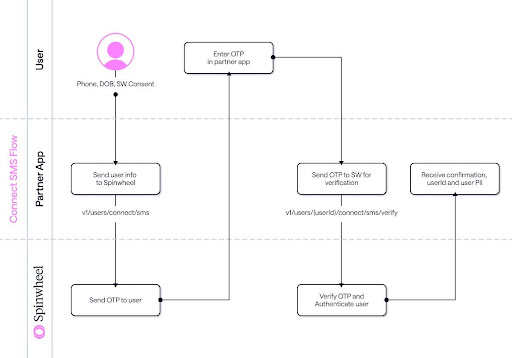
This flow diagram explains how a user can be connected using Connect SMS as the authentication mechanism:
-
Send a connect request via a POST to /v1/users/connect/sms/ with the end user's phone number, date of birth, and a unique extUserId that represents that user in your system.
📘 Reference: Connect via SMS
-
Upon submission, the user is sent a text message containing a one-time passcode with a unique code to present back via the API.
-
The code is submitted back to Spinwheel via /v1/users/connect/sms/verify.
📘 Reference: Verify SMS Code
-
Once the code is sent, Spinwheel performs synchronous checks and returns the status of the newly connected user.
Sandbox User Data
Sandbox test user identities have been set up in the sandbox environment to cover a variety of test scenarios. Default users need any valid U.S. mobile phone number plus date of birth.
📘 Fallback: In a small number of cases, we won't be able to verify a user's identity using only a phone number and date of birth. In those cases, fall back to the KBA connection API instead.
KBA Auth Flow
Before Getting Started
This Connect API triggers a series of questions used to validate who the user is.
As you integrate with Spinwheel's APIs, you are responsible for capturing consent along with displaying the following language to the user to proceed with a connection to the platform:
By continuing you agree to the Spinwheel End User Agreement. Further, you are providing “written instructions” to Spinwheel Solutions, Inc. authorizing it to obtain your credit profile from any consumer reporting agency.
Steps
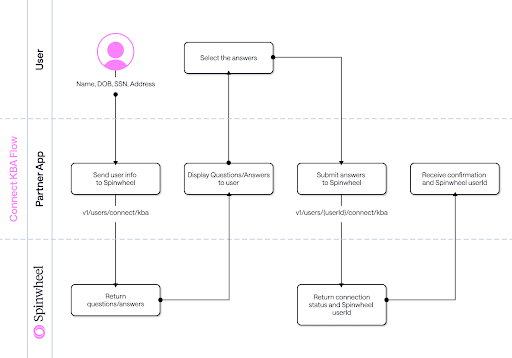
This flow diagram shows how a user's debt can be connected using a KBA mechanism:
-
Send a connect request via a POST to /v1/users/connect/kba with the end user's first name, last name, Social Security number, address, and a unique extUserId.
📘 Reference: Connect via KBA
-
On a successful match, Spinwheel returns a series of KBA questions requiring the user's input.
-
The user's answers are submitted back to Spinwheel via /v1/users/{userId}/connect/kba.
📘 Reference: Verify KBA Answers
-
Once submitted, Spinwheel verifies the answers and returns the status of the newly connected user.
Sandbox User Data
For testing KBA in a sandbox, use the KBA test identity.
Pre-Verified Users (Phone)
NOTE: You must contact Spinwheel to have this endpoint enabled.
The Pre-Verified (Phone) endpoint lets you connect a user who has already undergone pre-verification via phone number or SMS in your own system. It's designed for situations where you've already verified the user’s mobile device through a method like SMS.
Before Getting Started
You are responsible for capturing consent and sharing the following language with the user:
By continuing, you agree to the Spinwheel End User Agreement. Further, you are providing “written instructions” to Spinwheel Solutions, Inc. authorizing it to obtain your credit profile from any consumer reporting agency.
Steps
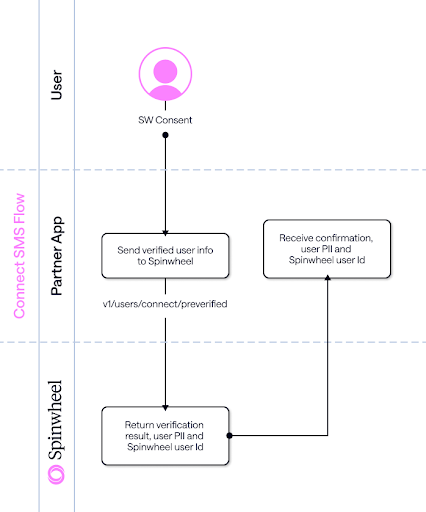
This flow diagram explains how pre-verified users can connect using Connect Pre-Verified Users:
- Send a connect request via a POST to 1. /v1/users/connect/preverified/phoneNumber with the end user's phone number, date of birth, verification date, user consent date, verification type, and a unique extUserId.
📘 Reference: Connect Pre-Verified (Phone Number) - Spinwheel verifies the user and returns their PII.
Network Token
📘 Reference: Create a Network Token User
Spinwheel’s Network Token lets you interface with other Spinwheel partners to pass leads, reduce authentication friction, decrease costs, and cut down on redundant data pulls for a connected user.
Network Configuration
Companies using Network Tokens need a configuration added to their setup to access this functionality. The process works on a producer-consumer relationship. This means tokens aren't accessible between organizations who haven't consented to interact with Network Token data.
📘 Confirm with your Spinwheel representative which organizations you expect to interface with using the Network Token.
User Creation From a Network Token
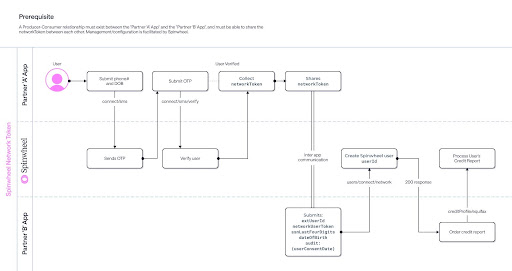
To create a user using the Network Token, you'll need to provide user data confirming you have the required consent to connect the user. This means the producer supplies supporting details alongside the token, such as date of birth, the last four digits of the Social Security number, and an audit object of the user consent date.
With all fields provided correctly, this API triggers user creation for that Network Token, populating all the same data fields as if the user had completed the connect steps directly. The user becomes eligible for a credit report, score, and other Spinwheel platform features under your API credentials.
Updated about 1 hour ago